
ClashX Download & Installation Guide
ClashX is a native graphical client for macOS, based on the Clash proxy core. It provides how-choose-service management, rule-based routing, proxy groups, and system proxy/TUN features. It supports both Apple Silicon and Intel architectures, focusing on stability, ease of use, and deep system integration.
ClashX Download
| Platform | Version | Official Releases |
|---|---|---|
| macOS | 1.118.0 | Official Releases |
Note:
Open the official release page and choose the package for your operating system and architecture from Assets.
Installation Steps
1. Install the Application

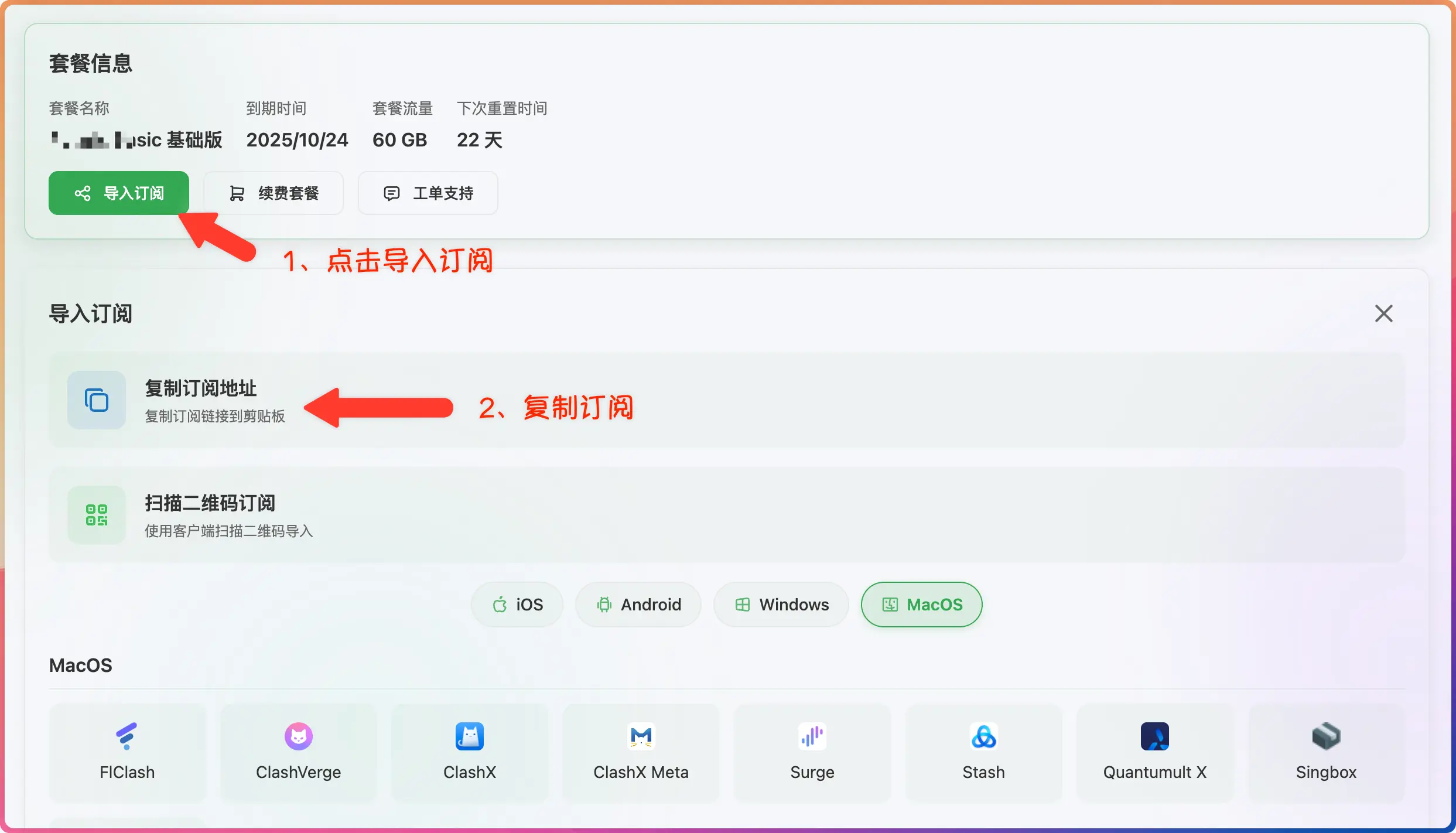
2. Get a Subscription
⚠️ Important:
Please note that ClashX is a proxy tool, not a proxy service provider. Installing it alone does not enable internet access. You need a how-choose-service (service provider) to get started. If you are unsure how to choose a provider, read How to Choose the Right Provider↗.
If you don't have a how-choose-service yet, Learn how to choose a provider↗
- Log in to the provider's official website
- Click to import how-choose-service
- Click to copy how-choose-service
3. Import Subscription
- Paste the how-choose-service address
- Click to download how-choose-service


4. Start Proxy
- Click to start the proxy
